

An all-in-one paid ads reporting system falls into one of three buckets in 2026: data pipes (Supermetrics, Funnel) that move metrics to spreadsheets, visual KPI dashboards (Databox, AgencyAnalytics), and Advertising Finance (AdFi) platforms like Flyweel that join Google Ads, Meta, and LinkedIn spend with CRM deals, Xero invoices, and virtual card controls1.
Quick Comparison TableLink to this section
| # | Solution | Best For | Starting Price | Rating |
|---|---|---|---|---|
| 1 | Flyweel | Real-time AdSpendOps clarity layer & AI | Free, Unlimited Spend | 9.8/10 |
| 2 | Supermetrics | Moving data to Sheets | $19/month | 9.2/10 |
| 3 | Funnel | Large-scale data mapping | $400/month | 9.0/10 |
| 4 | Hyros | Deep ad attribution | Custom | 8.9/10 |
| 5 | Triplewhale | eCommerce profit tracking (Shopify) | $129-$279/month | 8.8/10 |
| 6 | Domo | Enterprise business intelligence | Custom | 8.6/10 |
| 7 | Databox | Visual KPI tracking | $47/month | 8.7/10 |
| 8 | AgencyAnalytics | Client reporting | $12/month | 8.8/10 |
What is a Unified No-Code Ad Metrics Dashboard?Link to this section
A unified no‑code ad metrics dashboard is a tool that brings all your marketing data into one spot (See pricing). It connects to platforms like Google Ads, Meta, and LinkedIn. Then it pulls that data into a single view. You do not need to know how to write code to set it up. Most tools use “connectors.” You just log in and click a few buttons to sync your data.
In 2026, businesses need these tools more than ever. Ad platforms are getting more complex. If you are a B2B company, you likely have leads from many places. Tracking your Cost‑per‑Lead (CPL) across channels is hard if data is scattered. These dashboards show your total spend and total results in real‑time. This helps you make fast choices about where to put your money.
For sales‑led businesses, these dashboards close the loop. They link your ad spend financing options directly to your sales pipeline. You can see how an ad on LinkedIn turns into a lead in your CRM. Then into a closed deal. This “full‑funnel” view is the best way to prove your marketing is making money.
Top 8 Cross-Platform Ad Reporting Tools in 2026Link to this section
1.  Flyweel — Advertising Finance with AdSpendOps ClarityLink to this section

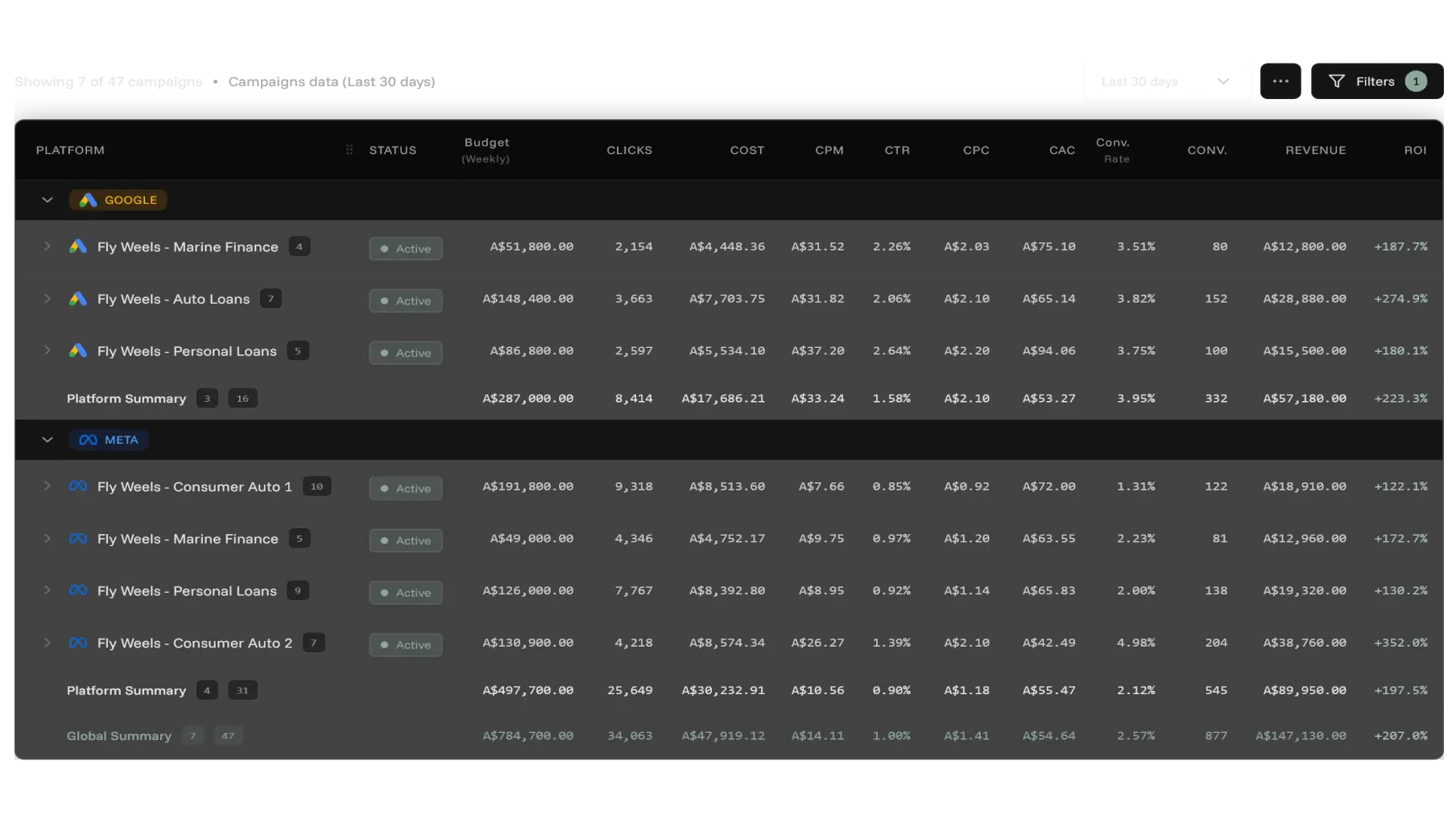
Flyweel is built for advertising businesses and pipeline-driven teams (B2B SaaS, lead sellers, financial and insurance brokers, law firms, home services trades, and medical or dental clinics) where ad spend goes out today and realized revenue lands weeks or months later. We are not a dashboard on top of your bank. In Flyweel, the cards, the limits, the ledger, and the funding all run on one live record of spend and returns.
You can connect your ad accounts, Pipedrive CRM, and Xero in minutes without writing code. AdGrid and the Flyweel AI Agent are strictly read-only for ad campaigns, so they never edit your bids, budgets, or creatives inside Google or Meta. Instead, when an ad account overspends or a billing discrepancy appears, owners and admins can act on the financial rail itself through the Flyweel MCP or dashboard.
Key FeaturesLink to this section
- AdSpendOps Clarity in AdGrid: Read-only cross-platform reporting across Google, Meta, and TikTok joined with Pipedrive CRM pipeline and closed revenue.
- Headless Finance via Flyweel MCP: Connect Claude, ChatGPT, or Cursor to read 222+ ad metrics (including campaign destination URLs and domains via
query_metrics), Pipedrive deals, and settled Flyweel Card charges in one thread. Owners and admins can calllist_cards,list_card_transactions,freeze_card,unfreeze_card,set_card_budget, andissue_card, where every card change shows a 5-minute confirmation preview before running. Read more in headless finance for ads. - Automated Xero Invoice Matching: Match Meta and Google billing receipts directly to Xero via Ad Invoice Reconciliation (30 reconciled invoices/month on Starter, and unlimited invoices auto-matched to Xero on Growth and Scale).
- Flyweel Cards & Performance Capital (US Only): Issue unlimited virtual Visa cards in Debit Mode (funded from your balance with $0 card or issuance fees, per-account caps, and alerts at 50, 75, and 100%) or Capital Mode (funding limits from $10k into the millions based on verified revenue and ad performance, a 5-minute application, no personal credit checks or personal guarantees, and a statement balance debited monthly). The Flyweel MCP and AdSpendOps reporting work worldwide, while Flyweel Cards are US-only today.
- Pre-built Integrations: Connect ad platforms, CRM deals, and accounting with a few clicks.
ProsLink to this section
- Joins ad platform metrics, settled virtual card charges, Xero invoices, and CRM deal revenue on one live record.
- Gives AI agents confirmation-gated card controls (
freeze_card,set_card_budget,issue_card) while keeping campaign access read-only. - Eliminates per-seat fees and waives the $99/month Growth platform fee when you put $25k/month on Flyweel cards.
ConsLink to this section
- Flyweel Cards (Debit and Capital) are currently US-only, while AdSpendOps reporting and the MCP server are available worldwide.
Best ForLink to this section
Pipeline-driven advertising businesses and founders (B2B SaaS, lead sellers, service businesses, brokers, law firms, trades, and clinics) that need paid ads reporting, virtual card controls, Xero invoice reconciliation, and CRM revenue on one live record.
PricingLink to this section
- Starter ($0/month): 2 ad accounts per platform (up to 6 verified), 30 reconciled invoices/month, 50 AI agent queries/month, unlimited ad spend cards, no seat fees.
- Growth ($99/month, or $0/month at $25k/month on Flyweel cards): 10 ad accounts (unlimited at $25k/month on cards or during the first 3 months for early adopters), unlimited invoices auto-matched to Xero, 200 AI agent queries/month.
- Scale ($299/month, or $0/month at $100k/month on Flyweel cards): 40 ad accounts, unlimited invoices auto-matched to Xero, priority support.
- Custom (Talk To Team): 40+ ad accounts, unlimited invoices auto-matched to Xero.
Overall Score: 9.8/10Link to this section
Flyweel wins because it connects reporting to the financial layer beneath ad spend: cards, Xero reconciliation, and working capital.
2. Supermetrics - Flexible Data ConnectorsLink to this section
Supermetrics is the gold standard for moving data from point A to point B. It is not a dashboard itself. It is a powerful engine that pulls data into tools you already use, like Google Sheets or Excel. If you like to build your own reports and want full control, this is a great pick. It has been around a long time and is very reliable.
The tool is known for its huge list of connectors. It can pull data from almost any ad platform. Once you set it up, you can schedule it to refresh your data every day or every hour. This means your spreadsheets stay up to date without copy-paste work. It saves a lot of time for marketers who live in data.
Key FeaturesLink to this section
- 100+ Data Sources: Connects to every major and minor ad platform.
- Google Sheets Integration: Pulls data directly into your sheets for custom math and charts.
- Scheduled Refreshes: Set your data to update automatically so reports stay fresh.
- Clean Data: It formats the data so it is easy to read and use right away.
ProsLink to this section
- Very flexible because you can build any report you want in a spreadsheet.
- Very reliable and rarely has data issues.
- Works with almost every marketing tool in your stack.
ConsLink to this section
- You have to build the actual dashboard in another tool.
- The cost can rise fast if you need many connectors.
Best ForLink to this section
Data‑savvy marketers and analysts who want to build custom reports in Google Sheets or Looker Studio.
PricingLink to this section
- Free Tier: 14‑day free trial available.
- Essential: Starts at $19/month for basic connectors.
- Core/Super: Higher tiers for more connectors and faster refresh rates.
Supermetrics is a great value if you already use Looker Studio to show your data.
Overall Score: 9.2/10Link to this section
Supermetrics is best at moving data. But it asks you to do the work of building the final view.
3. Funnel - Automated Data MappingLink to this section
Funnel is a heavy‑duty tool for teams with a lot of data. Its main job is to take messy data from different platforms and make it match. For example, if Google Ads calls a lead a “conversion” and Facebook calls it a “result,” Funnel can group them. This “mapping” happens automatically. It saves you hours of manual work.
Because it handles data so well, it is a favorite for large agencies and big B2B brands. It stores your data. So you never lose your history. You can then send clean data to any dashboard tool you like. It is a stable way to build a “source of truth” for your marketing team.
Key FeaturesLink to this section
- Automated Data Mapping: Aligns metrics from different platforms into one clear group.
- 500+ Connectors - the largest library of integrations in the industry.
- Data Transformation: Change and clean your data without code or scripts.
- Data Warehouse: Stores your past data so you can review trends over years.
ProsLink to this section
- Saves a huge amount of time on data cleaning and prep.
- Very strong for firms running ads on 10 or more platforms.
- Great support to help set up complex data flows.
ConsLink to this section
- The starting price is high compared to other tools.
- It can feel complex for a small firm with only two ad accounts.
Best ForLink to this section
Large marketing teams and agencies who need to clean and group data from many sources.
PricingLink to this section
- Free Tier: A limited free plan for very small accounts.
- Starter: Starts around $400/month for basic features.
- Business/Enterprise: Custom pricing for large data volume. It is a cost, but it pays off for teams that spend time fixing data.
Overall Score: 9.0/10Link to this section
Funnel is a powerhouse for data organization. But its price keeps it out of reach for some small firms.
4. Hyros - Deep Ad AttributionLink to this section
Hyros is a focused tool that solves one big problem: knowing exactly where your leads come from. Most ad platforms lose track of a person if they click on a phone but buy on a laptop weeks later. Hyros uses “digital fingerprinting” to follow that person the whole way. This helps B2B firms with long sales cycles.
The platform is known for its “Print Tracking” tech. It shows the true value of a lead over time. Instead of just seeing a click, you see a person. You can see every ad they saw before they booked a call or signed a deal. This helps you stop wasting money on ads that look good but never lead to sales. It is a “no‑code” setup. You just add a small script to your site.
Key FeaturesLink to this section
- Long‑Term Tracking: Tracks a lead for months to see their full value.
- Ad Platform Sync: Sends better data back to Google and Meta to help their AI find better leads.
- Call Tracking: Links your ad data to phone calls and sales meetings.
- Email Attribution: Sees when a lead from an ad buys after getting your emails.
- Simple Dashboards: Clean views that show your “True ROI” based on real bank deposits.
ProsLink to this section
- Very accurate data for high‑ticket sales and long B2B paths.
- Helps you find “hidden” winners that other tools miss.
- Great at tracking leads across devices and browsers.
ConsLink to this section
- It can be too costly for small firms just starting out.
- The setup asks you to be careful with your tracking links.
Best ForLink to this section
High‑ticket B2B firms and service providers with a long gap between first click and final sale.
PricingLink to this section
- Free Tier: No free version available.
- Paid Plans: Pricing is based on your annual ad spend and is custom.
- Enterprise: Custom setups for very large accounts.
Hyros is a top tool that pays for itself by cutting out thousands in “zombie” ad spend.
Overall Score: 8.9/10Link to this section
Hyros is the king of tracking accuracy. But its high cost makes it a tool for more established firms.
5. Triplewhale - eCommerce Profit TrackingLink to this section
Triplewhale is a Shopify-first analytics platform built specifically for eCommerce brands. It brings all your business data into one mobile‑friendly app focused on showing real‑time profit for online stores. It pulls in your ad spend from every platform and compares it to your Shopify revenue. This gives you a “North Star” metric for product-based businesses.
The app is built for speed. You can check your stats on your phone while getting coffee. It uses a special engine called “Meros” to show which ads are doing the most work for eCommerce sales. It is a great way to see your total “Marketing Efficiency Ratio” (MER) without doing math. However, it is designed for transactional eCommerce, not B2B lead generation or service businesses.
Key FeaturesLink to this section
- The Summary Page: A single screen showing spend, revenue, and profit across all channels.
- Meros Attribution: A custom model that shows the real impact of your ads.
- Mobile App: One of the best mobile views for checking ad stats on the go.
- Creative Reporting: See which images or videos perform best across platforms.
- Pixel Technology: A first‑party tracking pixel to skip privacy blocks on browsers.
ProsLink to this section
- The interface is very fast and easy to use.
- Gives a clear view of your daily profit and loss for eCommerce.
- Great for Shopify store owners who need quick daily checks.
ConsLink to this section
- Built exclusively for eCommerce, not suitable for lead gen or B2B service businesses.
- Cannot track leads, pipeline, or CRM data - only direct online sales.
- Some advanced tools are only on pricier plans.
Best ForLink to this section
Shopify and eCommerce store owners who need a quick daily view of profit and ad spend for product sales. Not recommended for service businesses or B2B lead generation.
PricingLink to this section
- Free Tier: Not available.
- Growth: $129/month for basic features and dashboard.
- Pro: $199/month with AI recommendations and RFM audiences.
- Enterprise: $279/month for creative insights and dedicated support. Triplewhale offers a great mix of deep eCommerce data and a simple, “no‑code” user experience for Shopify stores.
Overall Score: 8.8/10Link to this section
Triplewhale is excellent for eCommerce brands tracking daily profit. However, it is not designed for B2B lead generation, service businesses, or companies that need CRM integration. If you need to track leads and pipeline, Flyweel is a better choice.
6. Domo - Enterprise Business IntelligenceLink to this section
Domo is a full platform that does more than just ad metrics. It is a full “Business Intelligence” tool. It can link your ads to HR data, warehouse data, and finance data. For a large B2B firm, this is strong. You can see how ad spend affects every part of your company in one big, unified view.
Even though it is strong, it is still “no‑code” at its core. You can use their “Magic ETL” tool to drag and drop data blocks to clean your numbers. It is built to grow. If you have 100 ad accounts and 10 CRMs, Domo can handle it without slowing down. It is like a super-charged dashboard that scales with your firm.
Key FeaturesLink to this section
- 1,000+ Connectors: Can link to almost any software, not just ad tools.
- Magic ETL: A visual way to mix and clean data without code.
- Domo Appstore: Pre‑built dashboard templates you can add in one click.
- Real‑time Alerts: Get a text or email if your ad spend goes too high.
- Executive Dashboards: High‑level views made for CEOs and directors.
ProsLink to this section
- Can handle huge data loads that would break other tools.
- Very customizable for big firms.
- Strong security and data access rules.
ConsLink to this section
- It can feel overwhelming for small teams or solo marketers.
- The cost is much higher than most dashboard apps.
Best ForLink to this section
Large firms that need to see ad metrics with other business data.
PricingLink to this section
- Free Tier: They offer a “Free Forever” plan for small teams with low data needs.
- Standard/Enterprise: Pricing is custom and often starts in the thousands per year.
Domo is a “forever” tool you may never outgrow. But you pay for that power.
Overall Score: 8.6/10Link to this section
Domo is the most powerful tool here. But its complexity and cost make it too much for many small to mid‑size firms.
7. Databox - Simple Visual KPI TrackingLink to this section
Databox is all about making your data look clean and easy to read. It is one of the most used “no‑code” tools because it is so simple to start. You pick a “Databoard” template. Connect your Google Ads or Meta account. Your data shows up fast. It is perfect for teams that want to see their KPIs (Key Performance Indicators) with no fuss.
One of the best parts of Databox is the “Goal Tracking” tool. You can set a goal for monthly ad spend or your target CPL (Cost‑per‑Lead). The dashboard shows a progress bar. It tells you if you are on track or falling behind. This keeps your team focused on the numbers that matter for growth.
Key FeaturesLink to this section
- Dashboard Designer: A simple drag‑and‑drop tool to build your own views.
- Goal Progress: Set targets for any metric and track progress in real‑time.
- Metric Alerts: Get a Slack or email alert when a metric shifts fast.
- Multi‑Device Support: View dashboards on desktop, mobile, or even a TV in your office.
- Looped Reports: Combine dashboards into one “slideshow” for easy review.
ProsLink to this section
- Very easy to start, even if you’ve never used a dashboard.
- The templates look pro and great for client talks.
- The free plan is quite good for small firms.
ConsLink to this section
- It can be tough to do complex math across data sources.
- Some top visual tools are locked behind higher plans.
Best ForLink to this section
Small to mid‑size agencies and B2B teams who want a simple, visual way to track main marketing goals.
PricingLink to this section
- Free Tier: Free forever plan with 3 data sources and basic tools.
- Starter: $47/month for more data sources and daily refreshes.
- Professional: $135/month for hourly updates and more dashboards.
Databox is one of the most affordable ways to get a pro-looking dashboard for your ads.
Overall Score: 8.7/10Link to this section
Databox is best for users who care about ease of use and design over deep data work.
8. AgencyAnalytics - Automated Client ReportingLink to this section
AgencyAnalytics is a top pick for marketing agencies that manage many clients. It saves time by automating reports. Instead of spending hours every Friday making PDFs, this tool does it for you. It pulls data from all major ad platforms and puts it into a clean, white-labeled dashboard. Your clients can log in anytime.
The platform is easy to set up. You can connect your ad accounts, SEO tools, and social pages in seconds. It is a true “no-code” solution because everything is drag-and-drop. For B2B agencies, it links to CRMs. This helps you show clients how many leads you bring in, not just how much traffic their site gets.
Key FeaturesLink to this section
- White-Labeling: Add your logo and colors so dashboards look like your own software.
- Automated Reports: Schedule reports to go to clients every week or month.
- SEO Tools: Includes rank tracking and site audits with your ad metrics.
- Client Logins: Give each client their own login to check ad spend anytime.
- Goal Tracking: Set lead or spend targets for each client and track them live.
ProsLink to this section
- Very fast to set up for agencies with 10+ clients.
- The interface is easy for clients to use, no training needed.
- Shows SEO and PPC data on one screen.
ConsLink to this section
- Built for agencies, so it may not fit a single brand well.
- Some deep data cleaning tools are not as strong as in Funnel.
Best ForLink to this section
Best for marketing agencies that need to manage and report ad metrics for many clients at once.
PricingLink to this section
- Free Tier: 14-day free trial available.
- Freelancer: $12/month per client (min 5 clients).
- Agency: $18/month per client with more features.
- Enterprise: Custom pricing for large agencies. AgencyAnalytics is affordable for teams that need to scale reporting fast.
Overall Score: 8.8/10Link to this section
It’s the best tool for agencies that want to look pro and save time on manual reports.
How No-Code Dashboards Help Sales-Led BusinessesLink to this section
No-code dashboards give sales-led businesses a clear view of how marketing drives revenue and growth. For a business that relies on a sales team, ad metrics are only half the story. You don’t just want to know how many people clicked an ad. You want to know if those people talked to your sales team and bought something. This is where a unified no-code dashboard becomes a secret weapon.
These tools connect your ad platforms (like LinkedIn) directly to your CRM (like HubSpot or Salesforce). This creates a “bridge” between marketing and sales. You can see which ad campaign brought in a “High-Value Lead” versus a “Junk Lead.” This helps you stop wasting money on ad spend that brings in people who never buy.
By using Flyweel, you can track your Pipeline-led ROI (See pricing). This means you measure success by the value of deals in your sales pipeline, not just “likes” or “clicks.” In 2026, this is the only way to stay competitive. It lets you move your budget to the channels that fill your sales team’s calendar with qualified meetings.
Reporting Dashboards vs. Ad Spend Financing & Card InfrastructureLink to this section
You pay for ads today. You get paid weeks later. In between, a read-only reporting dashboard can show you that a campaign is winning, or that an ad account is overspending, but it cannot stop a rogue card charge, reconcile a Meta tax invoice in Xero, or float the 30 to 120 day cash gap while leads close in your CRM. We are not a dashboard on top of your bank. In Flyweel, the cards, the limits, the ledger, and the funding all run on one live record of spend and returns.
Advertising businesses outgrow standalone dashboards because the real operational work sits across three disconnected layers: the ad metrics tool, the corporate card portal, and the accounting file. When you combine an ads reporting tool with Flyweel Debit Cards, Performance Capital, automated Xero reconciliation, and headless finance via the Flyweel MCP, your team can verify settled card spend against reported conversions and act on card limits in the same place. The MCP server and AdSpendOps reporting work globally, while Flyweel Cards (Debit and Capital) are US-only today.
| Platform | Unified Ad & CRM Reporting | Automated Xero Invoice Reconciliation | Virtual Cards & MCP Agent Controls | B2B Pipeline Payback Funding |
|---|---|---|---|---|
| Flyweel | AdGrid unifies Google, Meta, and TikTok metrics with Pipedrive CRM deals and realized revenue (worldwide, read-only on ad campaigns) | 30 reconciled invoices/mo on Starter ($0); unlimited invoices auto-matched to Xero on Growth ($99/mo, or $0/mo at $25k/mo on cards) and Scale ($299/mo, or $0/mo at $100k/mo on cards) | Unlimited $0 virtual Visa cards (US only) with alerts at 50/75/100%, plus Flyweel MCP tools (list_cards, list_card_transactions, freeze_card, unfreeze_card, set_card_budget, issue_card, query_metrics with destination URLs) behind a 5-min confirmation preview | Capital Mode (US only) from $10k into the millions underwritten on verified revenue and ad performance; 5-min application, no personal credit check or guarantee, statement balance debited monthly |
| Opal Spend | None (tracks card spend by client or platform; no cross-platform ad metrics dashboard or B2B CRM pipeline attribution) | Basic bookkeeping export; no automated Xero ad-invoice matching tied to campaign ROI | Unlimited US virtual cards assignable by client or campaign with card caps; no MCP server for AI agents | Commercial card limits up to $10M with monthly statement debit and 1% to 1.5% cashback (plus Ad Pay invoice financing at a 3% fee) |
| Spendge | None (card transaction history and balance stats only; no ad platform metric sync or CRM deal attribution) | None (manual export only) | Multi-BIN virtual cards (24+ BINs in USD, EUR, GBP) with €1 to €5 issuance fees, 3DS routing, and API access; no MCP server | None (pre-funded balance via USDT crypto or bank wire transfers) |
| Clearco | None (connects to e-commerce checkouts like Shopify, Stripe, and Amazon for underwriting; no B2B ad-to-CRM reporting dashboard) | None (funds supplier and vendor invoices directly; does not reconcile ad tax invoices into Xero) | No virtual ad-spend card program and no AI agent spend controls | E-commerce Cash Advance and Invoice Funding up to $10M ($100k+/mo revenue required) with weekly revenue-capped payments over 4 to 12 months |
| Wayflyer | E-commerce analytics for funded merchants; no B2B lead-gen CRM pipeline attribution | None (connects sales and bank accounts for underwriting; no automated Xero ad-invoice matching) | No virtual ad-spend card issuance and no MCP agent controls | Revenue-based financing and term loans ($10k to $20M across 11 countries) repaid as a fixed schedule or share of sales |
Choosing the Right Solution for Your TeamLink to this section
Picking the right app depends on what you need to do with your data. If you just want to see your spend in one place, a simple tool like Databox is great. If you manage a million-dollar budget and want AI to help you decide, the AdSpendOps clarity layer in Flyweel is a better fit.
Think about your team’s skills. If you have someone who loves spreadsheets, Supermetrics is a powerful choice. If you want something that “just works” with no setup, AgencyAnalytics is a great choice. The goal is to spend less time building reports and more time using data to grow your business. Always pick a tool that gives a unified view so you never guess which ad channel is working.
How to Choose the Right Unified Ad Metrics SolutionLink to this section
Choosing the right unified ad metrics solution means more than just picking the cheapest option. You need a way to see your data that fits how your team works. If the tool is too hard to use, your team will stop using it fast. Here are five things to think about before you sign up.
Budget ConsiderationsLink to this section
If you are just starting, Flyweel offers a free tier with 30 invoices matched monthly and 50 AI queries - perfect for learning how to pull data and see unified metrics. As you grow, you can upgrade to the Growth plan at $99/month or use Databox starting at $47/month. For teams spending over $10k a month on ads, Flyweel helps you find ways to save money that pay for the tool itself.
Team Size and ExpertiseLink to this section
Do you have a data expert on your team? If yes, Supermetrics gives them the power they need. If you are a business owner who wants to see results fast, look for a “done-for-you” view. Flyweel is built for people who want answers, not more work. If you run a Shopify store, Triplewhale offers simple daily profit tracking, but it is not built for pipeline businesses.
Industry FitLink to this section
B2B companies need to see their sales pipeline. If you sell high-ticket services, you need a tool that connects to your CRM. Hyros handles deep tracking, while Flyweel is perfect for managing ad spend based on those sales. If you are an agency, AgencyAnalytics is almost always the best pick because of its client-facing features.
Timeline ExpectationsLink to this section
How fast do you need your data? Some tools refresh every hour. Others only update once a day. If you make daily changes to your ads, you need real-time visibility. Domo and Flyweel are built for quick decisions. If you only check stats once a week, a slower update is fine.
Integration NeedsLink to this section
Make a list of every ad platform you use, including Google, Meta, LinkedIn, and TikTok. Check how each tool connects to your CRM and accounting software. In Flyweel, AdGrid and the Flyweel MCP are strictly read-only on your ad campaigns so third-party software never disrupts platform bidding, while the MCP gives owners and admins confirmation-gated controls (freeze_card, unfreeze_card, set_card_budget, issue_card) on their Flyweel Cards alongside automated Xero invoice reconciliation.
Ready to stop wasting money on guesswork? See how Flyweel links your CRM to ad platforms for real-time optimization.
ConclusionLink to this section
Finding the best way to see all your ad metrics in one place is the first step to growing your business in 2026. You no longer need to be a coder to build a pro dashboard. Whether you want a simple view of your KPIs or a detailed breakdown of profit and loss, there is a tool on this list for you.
- Best for Real-Time Growth: Flyweel is the top pick for teams that want to manage spend and profit in one spot.
- Best for Agencies: AgencyAnalytics wins for its ease of use and client reporting.
- Best for Data Pros: Supermetrics is the best way to move data into your own custom sheets.
- Best for Visuals: Databox is the easiest way to make your metrics look great.
- Best for Shopify stores: Triplewhale is ideal for transactional eCommerce, but not for pipeline businesses.
Frequently Asked Questions
Where can I find an all-in-one paid ads reporting system?
Unified reporting comes from two kinds of tools: connectors like Supermetrics or Funnel that move raw platform data into a spreadsheet or BI tool, and the AdSpendOps clarity layer in Flyweel that reconciles Google, Meta, and TikTok spend against CRM revenue in one dashboard without a manual export step.
What is the best free all-in-one ad reporting tool?
Flyweel offers unlimited spend tracking on its free tier. Most connector tools like Supermetrics or Whatagraph cap free usage at one or two platforms before requiring a paid plan.
Do I need to code to connect Google and Meta ads to one dashboard?
No. All 8 tools in this guide use no-code connectors: you log in to each ad platform once and the tool syncs spend data automatically.
How do no-code dashboards help sales-led businesses track ad metrics?
They link ad spend straight to CRM records, so you see which ads produced booked calls and closed deals rather than clicks. A sales-led team can then judge a channel on pipeline value instead of platform ROAS. That matters when the sale happens weeks after the click, because the platform never sees the outcome that pays the bill.
What are the best no-code platforms for marketing automation dashboards?
Databox is strong for visual reporting, Supermetrics for moving raw platform data into a spreadsheet or BI tool, AgencyAnalytics for client reporting, and Flyweel for reconciling ad spend against CRM revenue. Pick on the job you need done. Connectors move data between systems. Reconciliation tools tell you whether the spend came back as revenue.
What is a unified no-code ad metrics dashboard?
It is a tool that pulls data from several ad platforms, such as Google, Meta, LinkedIn and TikTok, into one screen. You connect accounts by logging in rather than by writing code. The point is a single view of spend and performance, so nobody has to open five tabs and rebuild the same numbers by hand each week.
How does a unified no-code ad metrics dashboard work?
It uses prebuilt connectors that authenticate against each ad platform API. Once connected, it pulls spend, impressions, clicks and conversions on a schedule and maps them into a common set of fields. The tool then renders charts and tables over that shared data. Most also let you add CRM or revenue data so the numbers reach past the platform.
What are the benefits of a unified no-code ad metrics dashboard?
You save the hours spent exporting CSVs, you see every platform's spend in one place, and you spot a budget problem while it is still fixable. Consistent definitions across channels also stop two people reporting different numbers for the same week. The real gain is faster decisions, because the data arrives before the month closes.
How much does a unified no-code ad metrics dashboard cost?
Prices run from free to over $400 a month. Flyweel has a free tier with 30 invoices matched monthly and 50 AI queries, and paid plans from $99 a month. Databox starts around $47 a month. Funnel starts near $400 a month for enterprise use. Most small businesses land between $50 and $200 a month.
How do you implement a unified no-code ad metrics dashboard?
Most tools follow three steps. Create an account, connect each ad platform with its own login, then pick a template or build a view. Setup usually takes under 30 minutes for the platforms themselves. Budget more time for the part that matters: deciding which metrics you will act on, and connecting the CRM that holds the revenue.
What features should a unified no-code ad metrics dashboard have?
Look for automated data pulls, cross-platform reports built on a shared set of fields, goal tracking, and alerts when spend moves outside an expected range. Historical backfill matters if you want trend data from before you signed up. The feature that changes decisions is a revenue or CRM connection, because spend without outcomes is only half the picture.
Can I see my LinkedIn and Google Ads data together?
Yes. Every tool in this guide lets you view metrics from different platforms side by side. The thing to check is how each tool handles definitions that differ between networks, such as conversion windows and attribution models. Numbers that look inconsistent are usually not a bug. They are two platforms counting the same event differently.
Can these tools help me track cost per lead?
Yes. By joining ad spend to lead records, a dashboard can calculate cost per lead for every channel, campaign and ad set. The number is only as good as the lead data behind it, so deduplicate leads and mark disqualified ones. Otherwise cost per lead looks healthy while the leads reaching sales are worth much less.
Is my data safe in these dashboard apps?
Most established tools hold SOC 2 compliance and use read-only access to your ad accounts. They display your data rather than own it. Before connecting, check where data is stored, how long it is retained, and whether you can revoke access from the ad platform side. Grant the narrowest permission scope the tool will accept.
Can I use these tools on my phone?
Most do offer mobile apps, including Triplewhale and Databox, so you can check performance away from a desk. Mobile views usually show summary metrics rather than the full report builder. Treat the phone as a monitoring surface, not a place to make budget changes, because a small screen hides the context behind a number.


