

Blocking an AI agent from a website is not the same as rejecting a card payment. Advertisers need to separate platform access, payment authorization and spend controls.
An agent may be stopped before it can submit a purchase. A card may decline after a charge is submitted. A financial tool may refuse a change without human approval. Those are different failures, and they need different fixes.
For founders, media buyers, and finance leads evaluating AI agents for ad spend, that distinction decides how you wire your stack. Automating a website inside a browser and controlling the card funding paid ads are different layers. Pipeline-driven businesses running paid acquisition on Meta, Google, and TikTok need permissioned financial tools, not a bot impersonating a human in a bank portal.
What Is Actually Being Blocked?Link to this section
Recent headlines about blocked AI agents describe website access restrictions, not card-network payment rejections. When a site owner blocks an automated browser from loading pages or clicking checkout buttons, the agent is stopped at the front door before a payment rail is ever called.
Two September 2026 developments show how access policies work in practice:
First, on September 8, 2026, Meta launched Muse, a personal AI agent that runs on a dedicated virtual machine with its own browser [2]. Meta stated that Muse checks with the user before sensitive actions such as making a purchase, and that it can check out using Link by Stripe, which generates a one-time-use virtual card so the user’s primary card details stay hidden [2]. If a service has no public API, Meta noted, Muse uses the service through a browser the way a person would [1].
Within two weeks, Amazon blocked Muse from shopping on Amazon.com [1]. As GeekWire reported on September 21, 2026, users prompting Muse to buy items on Amazon received a popup warning: “Continued access by an unauthorized AI agent violates Amazon’s Conditions of Use, to which our customers have agreed” [1]. Amazon’s spokesperson stated that third-party applications making purchases on behalf of customers should operate openly and respect service provider decisions about whether to participate [1]. Following a Ninth Circuit ruling in August 2026 (with rehearing denied on September 10, 2026) that rejected federal anti-hacking claims when a user directs an agent but left contract and terms-of-use claims open, Amazon anchored its block in its Conditions of Use [1].
That reporting establishes a website access block, not a card decline. Muse having a valid Link payment method did not grant it Amazon’s permission to browse the store, and an interrupted browser task is not evidence that Visa, Mastercard, or Stripe rejected a charge. Public reporting also does not establish the underlying technical detection method Amazon used to identify Muse traffic [1].
Second, infrastructure providers now give website owners explicit controls to separate human visitors, search crawlers, and task agents. In its September 30, 2026 announcement, Cloudflare reported that daily requests from AI agents on its network grew by more than 1,700% over the prior year, and highlighted its separate Search, Agent, and Training controls alongside Web Bot Auth for cryptographic bot verification [3]. Cloudflare noted that site owners can disallow training and block browser agents on pages that rely on human ad views while keeping search indexing open [3].
| Source and Date | Layer Governed | What the Evidence Establishes | What It Does Not Establish |
|---|---|---|---|
| GeekWire report on Amazon and Meta Muse (21-22 Sept 2026) [1] | Website browser session and Conditions of Use | Amazon displayed a Conditions of Use warning and cut off Muse from browsing and shopping on Amazon.com. | Does not establish a card-network decline, and does not establish Amazon’s technical detection method. |
| Meta Muse launch announcement (8 Sept 2026, updated 30 Sept 2026) [2] | Agent VM browser, user approval, and Link wallet | Muse runs in a cloud VM browser, asks the user before purchases, and supports one-time virtual cards via Link by Stripe. | Capability to generate a virtual card does not establish a merchant’s permission to automate its website. |
| Cloudflare Agentic Web announcement (30 Sept 2026) [3] | Edge WAF, bot classification, and Web Bot Auth | Website owners can set separate Search, Agent, and Training access policies for automated HTTP traffic. | Does not establish blocked official advertising APIs or rejected card payments on ad platforms. |
For advertisers, the lesson is straightforward. Do not infer a payment-network failure from a blocked browser bot, and do not confuse website scraping with an authenticated financial integration.
Why Platform Access and Card Payments Are Different LayersLink to this section
Permission to enter a software system, permission to change a financial control, and authorization of a card charge happen on separate infrastructure layers. Treating them as a single “AI agent payment” step makes it impossible to tell why a workflow stopped.
When a lead-generation business, law firm, clinic, solar contractor, or B2B SaaS team runs paid ads, three distinct mechanisms sit between an AI assistant and the money leaving the account:
- Permission to enter a system (Platform Access). This is how software connects to an external service. If an agent drives a headless browser into a web UI without the operator’s consent, a web application firewall (WAF) or terms-of-service gate can block the session. By contrast, an official API or a Model Context Protocol (MCP) server uses explicit authentication, such as OAuth or a scoped API key, intended for machine requests.
- Permission to act (Financial Control Plane). Once connected to a financial tool, the system checks what the authenticated user and agent are allowed to do. Reading card balances or settled transactions is a read-only query. Freezing a card, issuing a card, or changing a card budget is a state-changing write action that requires role checks and human sign-off.
- Authorization of a charge (Payment Rail). The interface used to manage a card is not the card’s payment function. In paid advertising, your AI agent is not clicking a checkout button each time an ad serves. Instead, Meta Ads, Google Ads, or TikTok Ads stores the card and submits a postpay charge when campaign spend hits a billing threshold or a monthly invoice date. At that moment, the payment network and card issuer check whether the card is active, within its spend cap, and backed by available balance or credit.
| Layer | Question It Answers | Who Enforces It | What Happens When It Blocks |
|---|---|---|---|
| 1. System Access | Can this software connect to the platform or tool? | Website WAF, platform Terms of Use, or MCP OAuth server | The agent cannot read data or submit a tool call. Existing ad billing on saved cards is unaffected. |
| 2. Financial Control | Does this user have permission and confirmation to change a card rule? | The financial platform (for example, Flyweel MCP role and approval gates) | The proposed card freeze, budget edit, or card issue does not run. The card keeps its previous state. |
| 3. Payment Authorization | Is this specific ad platform charge approved to clear? | Card network (Visa/Mastercard) and card issuer | The charge declines when the ad platform bills the card. Ad delivery can pause if billing is not resolved. |
Separating these three layers prevents two common mistakes when using AI agents for ad spend:
First, website access restrictions do not automatically stop ad billing. If a website blocks an unauthenticated browser agent, any saved card inside your Google or Meta ad account will still be charged by the ad platform as campaigns spend.
Second, authenticated agent access does not guarantee that ad billing will continue uninterrupted. Even when your agent connects cleanly through an official MCP server, a charge submitted by Meta at midnight will still decline if the card is frozen, if the charge exceeds the card’s daily or monthly budget, or if your account balance is exhausted.
What Permissioned Finance Should Look LikeLink to this section
Permissioned finance gives an AI agent structured, role-scoped tools to read financial data and propose card changes, while keeping human approval and credential security outside the model’s reach. You should never hand a general-purpose browser agent your bank portal password or a shared corporate login so it can click around a finance dashboard on your behalf.
Impersonating a human in a banking UI is brittle and unsafe. If the bank changes a button selector, triggers a step-up challenge, or blocks automated browser sessions, your workflow breaks. Worse, an agent holding raw login credentials or full card numbers creates an unnecessary security exposure across every account in that portal.
A permissioned headless finance for ads workflow replaces browser impersonation with five structural guardrails:
- Authenticated protocol access rather than shared portal credentials. The AI client connects to an MCP server through OAuth or a revocable organization API key. The agent never types a password into a web form and never sees full card numbers (PAN), CVVs, cardholder phone numbers, or linked bank account details [4].
- Scoped roles and actions. Every tool call is checked against the signed-in user’s organization and role. Anyone with read access can ask questions about spend, but only organization owners and admins can request changes to a card [4]. Irreversible actions, such as permanently cancelling a card, remain restricted to the web application rather than exposed to an agent [4].
- A deterministic preview of the proposed change. When an owner or admin asks the agent to freeze a card, unfreeze a card, set a card budget, or issue a new virtual card, the tool does not execute immediately. It returns a structured preview showing the exact card, the current state, and the proposed change [4].
- Human confirmation before supported card changes. The change runs only after the human owner or admin explicitly confirms the preview. In Flyweel’s implementation, that approval is bound to that single action, expires after 5 minutes, and cannot be confirmed by the agent on the user’s behalf [4].
- Visibility into charges after the action. Once a control is set, the same connection lets the team inspect settled, pending, and declined charges alongside campaign metrics, with a freshness timestamp on every response so the operator knows how recent the ledger read is.
| Design Dimension | Browser Bot Impersonating a User | Permissioned Headless Finance (MCP) |
|---|---|---|
| How it connects | Logs into a web portal with stored user credentials | Connects via OAuth or scoped organization API key |
| What secrets the agent sees | Often exposed to DOM text, session cookies, or card details | Never sees full card number, CVV, address, or bank login |
| Role enforcement | Inherits whatever the shared login can click | Enforces owner/admin role checks per tool call |
| Execution gate | Clicks submit buttons in the browser | Generates a preview; requires human approval within 5 minutes |
| Failure visibility | Breaks silently on UI changes, CAPTCHAs, or WAF blocks | Returns explicit tool status, transaction state, and decline reasons |
Give your AI agent tools to read the ledger and stage card controls. Never give it raw credentials to impersonate you in a bank portal, and never let a write action execute without a human confirmation gate.
Where an Ad-Spend Workflow Can FailLink to this section
An ad-spend workflow has two separate flows: the control flow where an agent proposes a card change, and the billing flow where an ad platform charges the card and you reconcile the result. When something goes wrong, your first job is to locate which box in the sequence failed and pull the matching evidence before blaming the AI agent or the payment network.
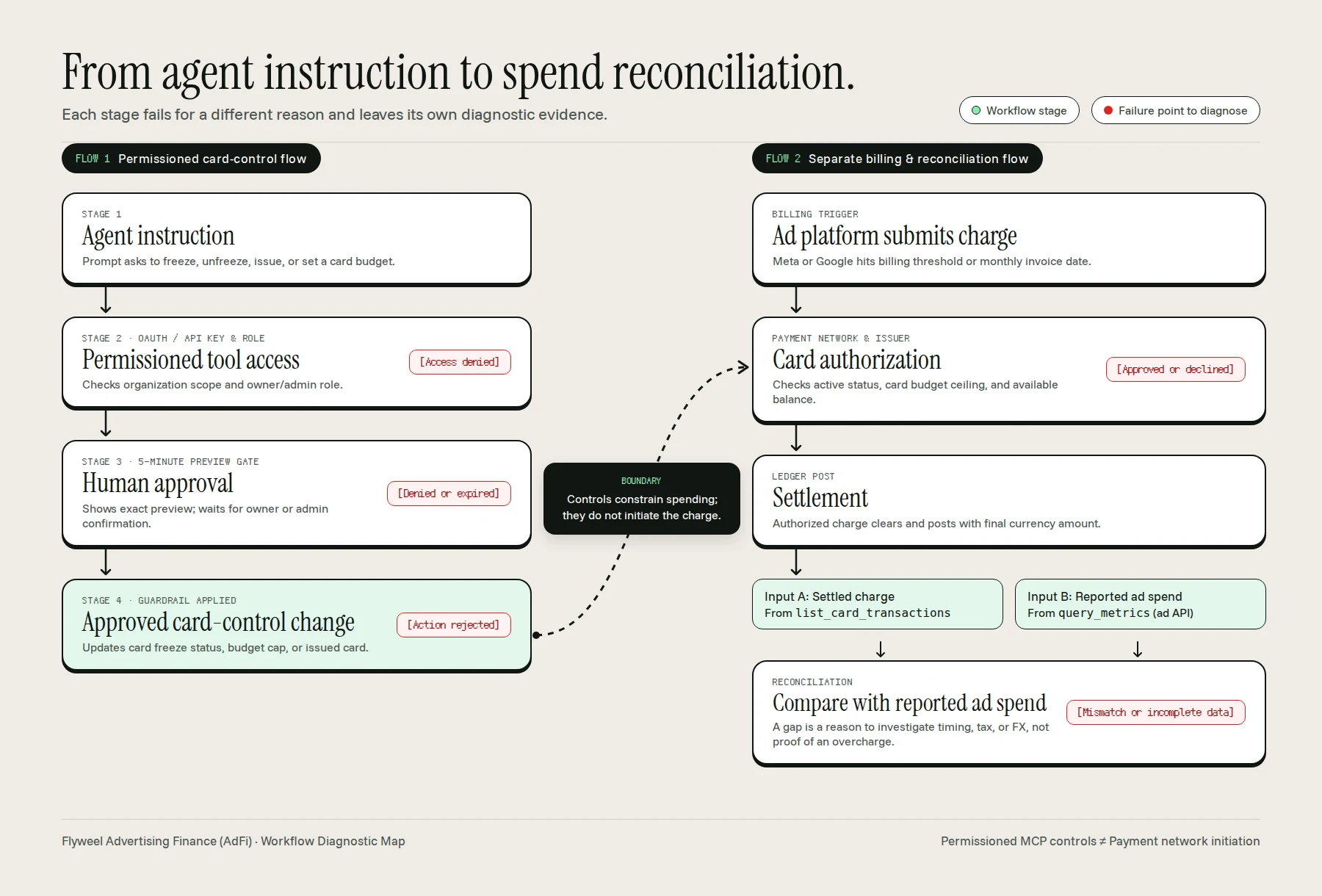
Instruction to reconciliation workflow with each failure point marked. Card controls constrain spending; they do not initiate the ad platform charge.
For screen readers and text-only agents, here is the exact structure of the two flows shown above:
- Flow 1: Permissioned card-control flow
Agent instruction->Permissioned tool access[Failure point: Access denied] ->Human approval[Failure point: Denied or expired] ->Approved card-control change[Failure point: Action rejected]
- Boundary between Flow 1 and Flow 2 (dotted connector from
Approved card-control changetoCard authorization): “Controls constrain spending; they do not initiate the charge.” - Flow 2: Separate billing and reconciliation flow
Ad platform submits charge->Card authorization[Failure point: Approved or declined] ->Settlement->Compare with reported ad spend(fed by two separate inputs: Settled charge and Platform-reported spend) [Failure point: Mismatch or incomplete data]
Diagnosing each failure point with the right evidenceLink to this section
Walking through the five failure points in order shows why each one requires a different fix:
Permissioned tool access->[Access denied]- What happened: The agent could not call the tool or was refused by the server.
- Why it happens: The OAuth session or API key is missing or expired, the user signed into the wrong organization, or a team member without owner or admin rights tried to call a write tool (
freeze_card,unfreeze_card,set_card_budget, orissue_card) [4]. - Evidence to check: The MCP tool error response and role message. If a non-admin requests a card change, the tool returns a clear reply stating that only an owner or admin can perform the action.
Human approval->[Denied or expired]- What happened: The agent staged the card change and showed the preview, but the card setting did not update.
- Why it happens: The owner or admin declined the preview, or did not confirm within the 5-minute approval window [4]. Because the agent cannot confirm on your behalf, an unconfirmed preview never executes.
- Evidence to check: The confirmation state in your AI client and the current card status returned by
list_cards. Re-issue the prompt and confirm within 5 minutes if you still want the change applied.
Approved card-control change->[Action rejected]- What happened: An owner or admin confirmed the request, but the platform rejected the parameter change.
- Why it happens: The request stepped outside product guardrails. Common examples include setting a card budget higher than the organization’s overall account limit, attempting to issue more than 5 cards within 24 hours, attempting to issue a card to someone who does not yet hold a Flyweel card login, or trying to call
issue_cardfrom the ChatGPT app while that specific action is still in review with OpenAI [4]. - Evidence to check: The tool validation response alongside
list_cards(which shows the account limit, card status, and active budget rules).
Card authorization->[Approved or declined]- What happened: Meta, Google, or TikTok submitted a charge against the saved card, and the charge was either approved or declined at the payment rail.
- Why it happens: Remember the dotted line in the diagram: controls constrain spending; they do not initiate the charge. A successful card-control change never guarantees payment acceptance. When the ad platform initiates a threshold charge, the issuer checks whether the card is currently frozen, whether the charge would push spend past the card’s daily, weekly, monthly, or lifetime budget, whether the merchant category is allowed (Flyweel cards are locked to advertising and marketing merchants), and whether your account has sufficient balance or limit [4].
- Evidence to check: Call
list_card_transactionsto inspect the declined transaction, timestamp, amount, merchant name, anddecline_reason. Do not guess why a payment failed from campaign delivery dips alone; read the decline code on the transaction record.
Compare with reported ad spend->[Mismatch or incomplete data]- What happened: The charge was authorized and settled, but the settled card total does not match what the ad platform reported for the same dates.
- Why it happens: Reconciliation takes two separate inputs: the settled charge from your card ledger (
list_card_transactions) and platform-reported spend from the ad platform API (query_metrics). A mismatch between those two numbers is a reason to investigate, not automatic proof of an overcharge. Ad platforms bill on postpay payment thresholds or monthly cycles, so a charge settling on the 2nd of the month often covers ad delivery from the final days of the prior month. Taxes, foreign-exchange conversion on cross-currency bills, pending charges that have not yet settled, and the 30-minute ledger sync interval can also create temporary gaps [4]. - Evidence to check: Compare settled and pending totals from
list_card_transactionswithquery_metricsacross the full monthly cycle, check foreign currency amounts, and read the data freshness timestamp on the reply. Only after ruling out threshold timing, pending charges, tax, and currency conversion should you isolate unmatched charges as a billing dispute candidate.
| Failure Point | Layer | Primary Evidence Needed to Diagnose | Typical Fix |
|---|---|---|---|
[Access denied] | Tool Access (Flow 1) | MCP authentication state and user role check (owner/admin required for writes) | Re-authenticate OAuth/API key or route the request to an organization owner or admin. |
[Denied or expired] | Human Approval (Flow 1) | Client confirmation prompt status and list_cards state | Re-run the card change request and confirm the preview within the 5-minute window. |
[Action rejected] | Control Validation (Flow 1) | Tool error message and account limit in list_cards | Keep card budgets within the account limit and respect the 5-cards-per-24h issuing cap. |
[Approved or declined] | Card Authorization (Flow 2) | list_card_transactions status and decline_reason field | Unfreeze the card, raise the card’s budget cap, or top up the underlying account balance. |
[Mismatch or incomplete data] | Spend Reconciliation (Flow 2) | list_card_transactions (settled vs pending) compared against query_metrics | Check threshold billing dates, pending charges, tax, FX conversion, and ledger sync timestamp. |
What Flyweel SupportsLink to this section
Flyweel connects your AI agent to ad performance, CRM pipeline, and Flyweel Cards1 through a single permissioned MCP server. Rather than building a browser bot to scrape banking tabs or bypass platform rules, you work from the AI assistant you already use with explicit financial guardrails.
According to Flyweel’s published launch specification, the MCP connection supports three core workflows [4]:
- Read cards and transactions alongside ad performance. Two read-only card tools,
list_cardsandlist_card_transactions, sit besidequery_metricsandlist_ad_accounts[4]. In a single conversation in Claude, ChatGPT, Cursor, or a terminal client, you can read active card budgets, remaining limits, and settled, pending, or declined charges right next to your Google, Meta, and TikTok campaign performance and Pipedrive deals. - Request supported card changes with owner/admin confirmation. Four write tools let an organization owner or admin manage cards from the agent:
freeze_card,unfreeze_card,set_card_budget(daily, weekly, monthly, or lifetime), andissue_card[4]. Every write tool previews the exact change first and executes only after human confirmation within 5 minutes. If an ad account is compromised and you are locked out of Ads Manager, an owner can freeze the dedicated card funding that account in seconds while leaving every other card and campaign running [4]. - Compare settled charges with reported ad spend. Instead of exporting CSVs from a bank portal and Ads Manager at month-end, you can ask the agent to compare what a card actually settled against what the ad platform reported for the same period, flag charges with no matching campaign spend, and check how much card headroom remains before scaling a winning campaign [4].
For the full walkthrough of prompts, reconciliation workflows, and hijacked-account protection, read our product explainer on headless finance for ads. When you are ready to connect your own client, follow the step-by-step MCP setup guide.
Claim boundaries and current limitationsLink to this section
To evaluate AI agents for ad spend accurately, be clear about what Flyweel’s workflow does not do and where eligibility rules apply [4]:
- No autonomous payment execution. Flyweel MCP tools manage card controls and read transactions; they do not autonomously initiate or execute payments without human approval.
- No guaranteed payment acceptance. Approving a card budget or unfreezing a card sets the control boundary on Flyweel’s side. Whether a charge clears still depends on available balance or limit, card status, merchant category locks, and authorization at the time the ad platform bills the card.
- Not a workaround for platform restrictions. Flyweel is an authenticated MCP integration for your own ad accounts and cards, not a tool to bypass website bot blocks or platform terms of service.
- No automatic recovery of disputed charges. The agent can isolate unmatched charges and help draft a refund or dispute request with transaction evidence, but a human submits the claim and the ad platform or card issuer decides the outcome.
- Card eligibility and client limits. The Flyweel MCP server is free and works worldwide for ad platform and CRM reporting. The card tools require Flyweel Cards in either debit mode or capital mode, which are available to US businesses only today. Card cancellation stays in the Flyweel web app, cards are locked to advertising and marketing merchants, new card issuance is limited to existing cardholders (up to 5 cards per organization in 24 hours),
issue_cardis not yet live inside the ChatGPT app, and card ledger data updates on each card event plus a 30-minute sync check [4].
Control Ad Spend From Your AI Agent With Human Sign-Off
Read ad performance, CRM deals, and card charges in one connection, and require owner or admin approval before any card limit or freeze changes.
This article cites the following dated reporting and primary documentation sources:
[1] GeekWire (Todd Bishop), Amazon blocks Meta’s Muse AI assistant in new standoff over agentic shopping (Published 21 September 2026; updated 22 September 2026) - Original Reporting
[2] Meta Newsroom, Introducing Muse: The World’s First Personal AI Agent Built for Everyone (Published 8 September 2026; updated 30 September 2026) - Primary Source
[3] Cloudflare Blog, The Internet has a second audience (Published 30 September 2026) - Primary Source
[4] Flyweel, Headless Finance Is Live: Control Ad Cards From Any AI Agent (Published 7 October 2026) - Product Specification
Frequently Asked Questions
Can platforms block agents?
Yes. Website operators can restrict automated browsers and agents through terms of service and technical access controls. In September 2026, Amazon blocked Meta's Muse assistant citing its Conditions of Use, and Cloudflare offers separate Search, Agent, and Training controls for site owners. Those website blocks govern page access, not every official API or card payment method.
Can card payments still decline?
Yes. Agent access to a financial tool and human approval of a card setting do not guarantee that a card charge will be authorized. When an ad platform submits a charge at a billing threshold or invoice date, the card network and issuer decide authorization at that moment. Diagnose the actual transaction record and decline reason rather than inferring a cause from agent logs.
What requires human approval?
In Flyweel's published MCP specification, human confirmation from an account owner or admin is required before freezing a card, unfreezing a card, issuing a new virtual card, or setting a card budget. The agent displays a preview of the change first, the approval expires after 5 minutes, and the agent cannot approve its own request.
Does an AI agent need my bank portal login or full card number to manage ad spend?
No. In a permissioned headless finance workflow, you connect once via OAuth or an organization API key. The agent reads card nicknames, last four digits, limits, and transaction statuses from Flyweel's ledger without ever seeing full card numbers, CVVs, cardholder addresses, or bank portal credentials.


